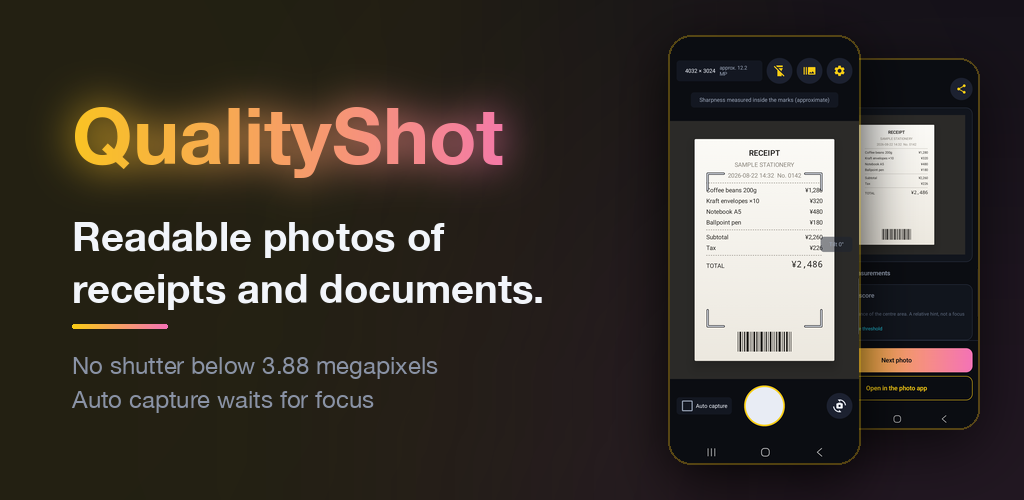
QualityShot — readable photos of receipts and documents. The capture screen and the recorded measurements screen. QualityShot app icon

Made for photos you will need to read later, such as receipts.
While the output is below 3.88 megapixels, the capture button stays disabled. After each shot, the app records the output pixels, output format, tone levels in use and sharpness score, and you can share them with the photo. A stack of receipts can be shot in one go with continuous capture.

See the features How it works
3.88 MP
No capture below this pixel count
8bit / ch
Output format: JPEG (8 bits per channel)
0
Photos and measurements sent off this device

10 features

Nothing extra. It keeps unreadable photos from being taken, and records measurements after each shot.

Resolution gate 📐

No capture below 3.88 megapixels

When the app opens, it checks how many pixels will actually be delivered. Below the requirement, the capture button stays disabled, and the screen shows why.

Auto capture ⏱️

Waits for focus, then shoots

After you press the shutter, nothing is taken until the sharpness in the middle of the frame reaches the threshold. It never settles for a weaker shot when time runs out. Press again to stop.

Continuous capture 🔁

A stack of receipts in one go

Instead of moving to the result screen after each shot, the app goes straight back to being ready for the next one. The resolution check and the measurements for each photo stay the same.

Capture aids 🔦

One-handed, even in the dark

The volume keys also work as a shutter, so you can hold the paper down while you shoot. When it is dark, turn on the light from the capture screen.

Capture aids 📐

Hold it level, see where it measures

The device tilt is shown as a number. The area where sharpness is measured can be shown as a frame if you turn it on in Settings. Both are display only and do not change what is recorded.

Measurement 🎚️

Output format and tone levels in use

The output format is JPEG (8 bits per channel). On top of that, the app measures how many of the 256 levels are actually used in each of R, G and B. The value depends on the subject, so it is not used to judge quality.

Measurement 🔍

Sharpness score (Laplacian variance)

A hint for checking focus, calculated from the high-frequency detail in the middle of the frame. It means little for subjects with few clues, such as blank paper, so the app shows "Undetermined" for them.

Share 📤

Share with the measurements attached

Send the photo together with a summary of its measurements through Android's share menu. The recipient can also see what resolution the photo was taken at.

Privacy 🔒

Photos and measurements stay on your device

No server, no account. Sharing happens only when you do it. The ad SDK (Google AdMob) does use the network.

Price 🆓

Free to use

No in-app purchases, no feature limits, no trial period. Ads appear only on the result and settings screens, never on the capture screen.

Three steps

Open the app and the resolution check begins.

1

Open the app and point it at the receipt

As soon as it starts, the app checks the current output resolution. While the requirement is not met, the shutter stays disabled and the reason is shown.

2

Press the shutter

You can capture only when the output is 3.88 megapixels or more. The shutter works with the on-screen button or the volume keys. With Auto capture on, the app waits after you press it until the sharpness in the middle of the frame reaches the threshold, then shoots automatically.

3

Share with the measurements attached

Pass the photo on to wherever your expense claim goes, with four items attached: output pixels, output format, tone levels in use and sharpness score. While Continuous capture is on, this screen is skipped and you go straight back to the next shot.

Before you start

Better to tell you up front what the app does not do than to have you find out later.

—What this app does not do

  • 📵
    Capture with a camera that cannot deliver 3.88 megapixels

    If the device falls short of the requirement, that camera cannot capture. On some models the front camera falls short.

  • 🔤
    Text recognition (OCR), scanning or PDFs

    The app goes as far as leaving a photo that can be read later. Use your usual apps to read or submit it.

  • 📏
    Straighten a tilted page (keystone correction)

    Tilt is shown as a number while you shoot, but the image is not corrected afterwards, because it would no longer match the recorded measurements.

  • ⚖️
    Compare sharpness scores across devices

    How the value comes out depends on the model and the subject. Use it as a relative hint under the same conditions.

  • 🌫️
    Tell intentional background blur from missed focus

    Both lower the score in the same way. The final call is yours.

  • 🎨
    Judge image quality by tone levels in use

    It is a measured value that varies with the subject. A smaller number does not mean lower image quality.

  • 🗂️
    Review measurements of photos from continuous capture

    There is no capture history, so sharing with measurements is done from each photo's result screen. During continuous capture, a short notice tells you each photo was saved, and adds a note when focus may be soft or sharpness could not be judged.

  • 🗜️
    Keep image quality after sharing

    The receiving app may re-compress the image. What happens from there is out of the app's hands.

Get it on Google Play

Requires Android 8.0 (API 26) or later